Keytimes: One Button, Several Jobs
Keytimes turns one footswitch into several. Each tap steps the button to its next state — its own message, its own LED color, its own screen label — and holds get a completely separate cycle. One switch can tap through three reverb levels and hold for a tuner.
This is the MIDI Captain MAX answer to the OEM SuperMode behavior, with per-state control over everything the button does.
Setting one up
In the Config Editor, set the button's Mode to Keytimes (short/long). Two sections appear — Short Press Cycle and Long Press Cycle — each with an + Add entry button. Every entry is one state of the button.
You don't have to use both. A button with only short entries is a plain multi-state tap button; one with only long entries does nothing until you hold it.
Taps: the short press cycle
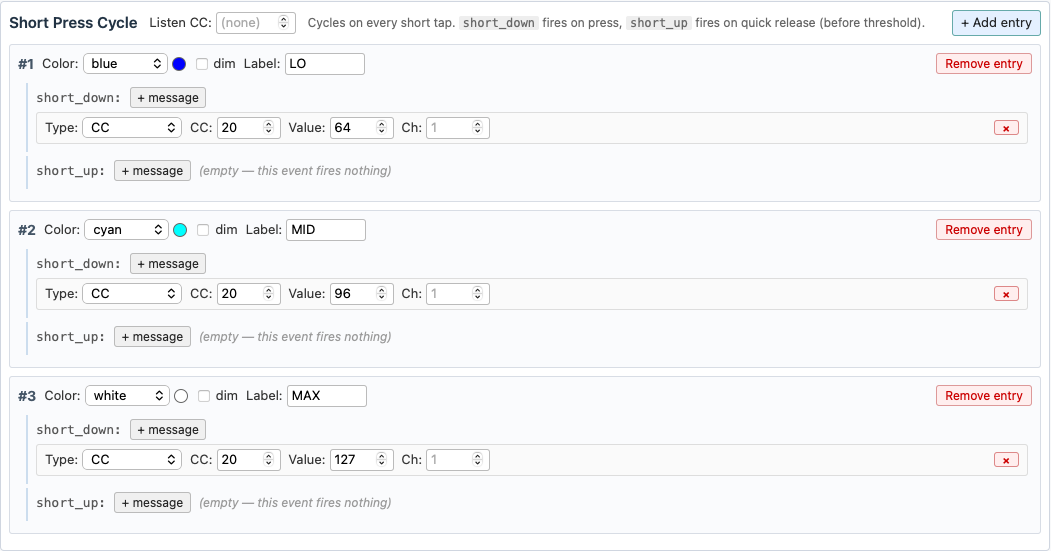
Each tap fires the next entry and wraps around at the end. Above: tap for 50% wet, tap for 75%, tap for 100%, tap back to 50% — with the LED going blue, cyan, white and the screen showing LO, MID, MAX.
Per entry you get:
| Field | What it does |
|---|---|
| Color | LED color for this state. Leave it on (inherit) to use the button's own color, or pick off to go dark |
| dim | render that color at low brightness |
| Label | screen text for this state (6 characters max). Blank inherits the button's label |
| short_down | messages fired the instant you press |
| short_up | messages fired when you release (before the hold threshold) |
An empty slot does nothing at all — no MIDI, no LED change, and the cycle does not advance. That's deliberate: it's what lets you build a hold-only button that taps can't disturb.
Holds: the long press cycle
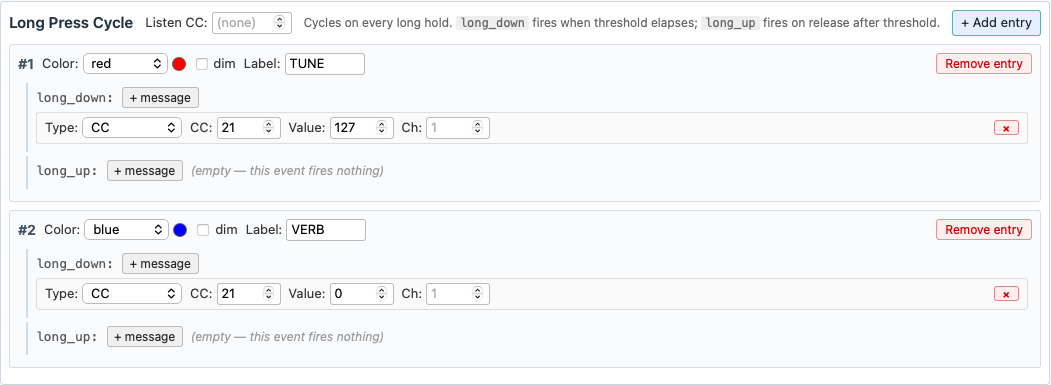
Holds work the same way on their own counter: long_down fires the moment you cross the hold threshold (while still holding), long_up fires when you let go.
Tapping never moves the long cycle, and holding never moves the short one — with one exception, below.
The one gotcha: a hold also fires short_down
Pressing the switch fires short_down immediately, every time — including at the start of a hold. So if your short entries put their messages in short_down, holding the switch fires them too, and steps the short cycle along with it.
If you want taps and holds to stay fully independent, put the short messages in short_up instead. That slot only fires on a release before the threshold, so a hold never touches the short cycle. The tradeoff: the message goes out when you lift your foot rather than when you press.
Use short_down when you want instant response and don't mind holds advancing the taps too.
Hold threshold and color behavior

Long-press threshold (ms) is the tap/hold boundary for this button. Leave it blank to use the global default of 500 ms. Raise it if you're triggering holds by accident mid-song; lower it if holds feel sluggish.
Long-press color overrides short-press color changes what the LED shows. Off (the default), the LED reflects whichever you did most recently — tap and you see the tap color, hold and you see the hold color. On, the hold color sticks while you keep tapping, which is what you want when a hold turns on a mode you need to stay visible.
What the LED and screen show
Normally the last press wins, and colors resolve in this order:
- A short entry set to off turns the LED dark — it beats everything, so
offworks as a kill switch. - Otherwise a hold color, if the entry sets one.
- Otherwise a tap color.
- Otherwise the button's own LED Color.
The screen label follows the same last-press-wins rule, falling back to the button's label when an entry doesn't set one. A button's LED Off Color is ignored in keytimes mode — the cycle entries own the LED.
What an entry can send
Each slot takes any message the editor offers: CC, Note, PC Fixed, PC+ / PC-, CC+ / CC-, HID (keyboard/mouse), and Page+ / Page- / Page Jump. One entry can hold several messages — click + message again.
Two worth calling out:
- CC+ / CC- entries with the CC left empty only pick a direction. The CC number, range, step size and slot names are set once on the button and shared by every such entry, so one switch can tap the value up and hold to take it back down. Fill in an entry's CC to have it step that CC instead, with its own step, range and wrap.
- Page+ / Page- / Page Jump in a long entry is the usual way to put page switching on a hold while taps do something musical.
Following the host
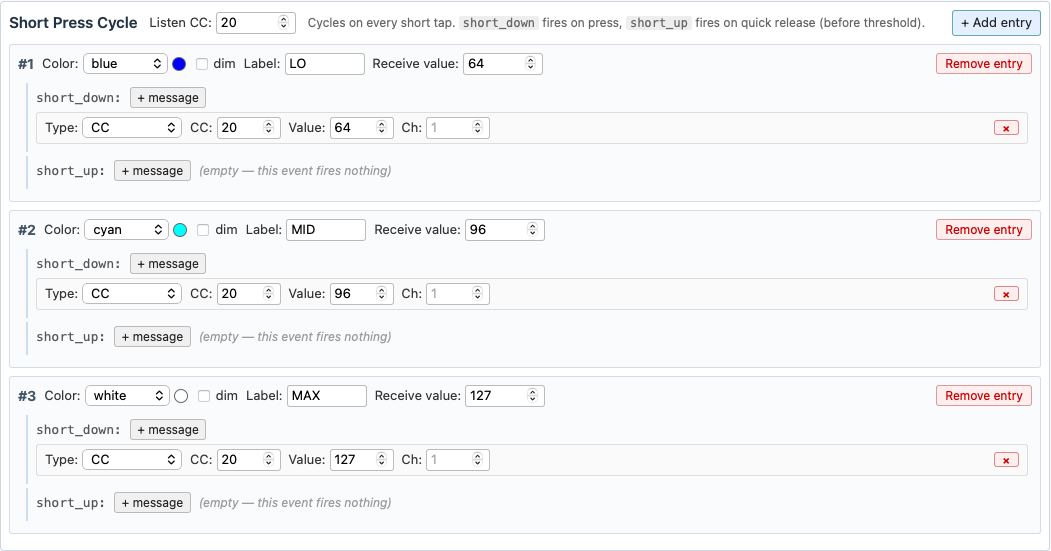
A keytimes button can also take its position from the host, so it stays in step when the host changes the setting itself (a scene recall, a snapshot, another controller):
- Set Listen CC on the cycle to the CC your host reports the setting on. Each cycle has its own, and it listens on the button's Channel.
- Give each entry the Receive value the host sends for that state. The field appears once the cycle has a Listen CC.
When a value arrives that matches an entry, the cycle moves to that entry and the LED and screen show it. The entry's messages are not sent, so nothing echoes back to the host. Your next tap continues from there to the following entry.
- An entry with no Receive value can't be reached from the host; taps still reach it.
- A value that matches no entry is ignored.
- If two entries share a value, the first one wins. The editor flags the later one.
Above: the host reports the reverb's wet level on CC 20, so the button follows when the host changes it.
Pages reset the cycles
Switching pages puts every keytimes button on the incoming page back at entry #1, showing the button's own color and label until its first press. Shared CC+ / CC- values and PC patch memory are not reset.
Scenarios
Three reverb levels, taps only. Three short entries, each a CC with a different value, each its own color and label. No long entries — holding does nothing.
Tap to toggle, hold for the tuner. Two short entries in short_up (on and off, the off one with Color off so the LED goes dark), and two long entries toggling your tuner CC in red. Because the taps live in short_up, holding for the tuner never disturbs the toggle.
Hold to change page. One short entry sending your normal message, one long entry with a Page+ message. A quick tap plays; a hold moves to the next page.
A mode that stays lit. Tick Long-press color overrides short-press color, give the long entry a distinct color and label, and it stays on screen while you keep tapping the short cycle underneath it.