Inbound MIDI: Host-to-Device Button Sync
The stock MIDI Captain firmware is send-only: the pedal talks, nothing talks back. MCM is bidirectional. Your host — Helix, Ableton, MainStage, a lighting rig, anything that can send MIDI — can drive the pedal's LEDs and button state, so what you see on the floor always matches what's actually happening in the rig.
This document covers the two per-button receive modes: state sync and select sync. Two related inbound features — MIDI-IN page switching and the MIDI THRU routing matrix — are documented separately.
How messages arrive
MCM listens on both inputs simultaneously:
- USB MIDI — messages from the connected host
- 5-pin DIN MIDI IN — messages from other hardware
Both feed the same processing. A message matches a button when the message type, number, and channel all line up with that button's config:
| Button type | Matches on |
|---|---|
cc | CC number + channel |
note | Note number + channel |
pc | Program number + channel (select mode only) |
Channels are matched exactly. A button configured for channel 1 ignores the same CC on channel 2. (Config files use 0-indexed channels; the editor displays 1–16.)
Receiving is LED-and-state-only: an inbound message updates the pedal's display and internal state but never causes the pedal to re-send MIDI. There is no feedback-loop risk — you can safely wire your host to echo every change back to the pedal.
Only buttons on the active page react to inbound messages.
Mode 1: State sync (toggle, momentary, and friends)
Any non-select cc or note button tracks inbound messages as a host override: whatever the host says, the button becomes.
CC buttons
The incoming value is checked against the button's configured cc_on and cc_off:
- Value equals
cc_on(default 127) → button turns on - Value equals
cc_off(default 0) → button turns off - Anything else → falls back to the classic MIDI convention: value > 63 = on, ≤ 63 = off
The fallback means hosts that send generic 0/127 keep working even if you've customized cc_on/cc_off to other values. Because cc_on is checked first, setting cc_on == cc_off would make the button impossible to turn off via that value — the firmware warns about this at boot.
If several non-select buttons share the same CC and channel, the first matching button in scan order (top-left to bottom-right, by button index) receives the update. When a select-mode button shares that CC too, which button actually reacts depends on scan order in a different way — see Shielding below.
Note buttons
- NoteOn with velocity > 0 → button on
- NoteOn with velocity 0, or NoteOff → button off
Example: Ableton track-arm feedback
Button 3 sends CC 20 to toggle an Ableton device. Map Ableton to also send CC 20 back out when the device state changes (via the same MIDI mapping or a Max for Live feedback patch). Now toggling the device from your laptop, a push controller, or automation lights up button 3 correctly — the pedal never goes stale.
Example: Gig Performer 2-Way sync
Button 3 sends CC 20 to toggle a widget in Gig Performer. In Gig Performer's Edit mode, select the widget and go to the MIDI tab in the Widget Properties pane.
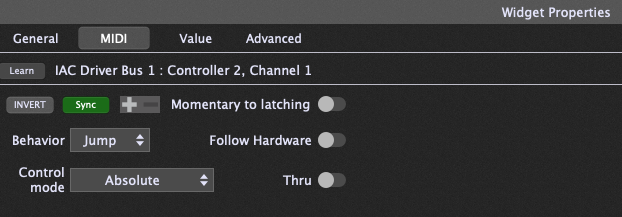
Click to select the Sync behavior. This maps Gig Performer to also send CC 20 back out when you click the widget in GP.
Now toggling the device from your laptop, a push controller, or automation lights up button 3 correctly — the pedal never goes stale.
Mode 2: Select sync (radio groups)
Buttons with mode: "select" behave as a radio group locally — pressing one activates it and dims its select_group siblings. Inbound MIDI can drive the same behavior from the host side.
CC select buttons
A select button activates only on an exact cc_on match. Near-misses are deliberately ignored — a stray value can't falsely flip your active snapshot.
Several select buttons may share one CC number and differ only by cc_on. This is exactly how Helix snapshots work:
// Four buttons, all CC 69, one per snapshot
{ "type": "cc", "cc": 69, "cc_on": 0, "mode": "select", "select_group": "snap", "label": "SNAP1" },
{ "type": "cc", "cc": 69, "cc_on": 1, "mode": "select", "select_group": "snap", "label": "SNAP2" },
{ "type": "cc", "cc": 69, "cc_on": 2, "mode": "select", "select_group": "snap", "label": "SNAP3" },
{ "type": "cc", "cc": 69, "cc_on": 3, "mode": "select", "select_group": "snap", "label": "SNAP4" }
When the Helix changes snapshots (from its own footswitches, a preset load, or automation) and sends CC 69 back out, the matching button lights and its siblings dim. The pedal always shows the true active snapshot.
Shielding
Once a select button claims a CC number, non-select buttons on that same CC are shielded from it. Without this, an inbound CC 69 = 2 would match no select button's cc_on exactly, fall through to a plain toggle button on CC 69, and spuriously flip it via the >63 fallback. Values that match a select-claimed CC but no cc_on are consumed silently — no state change anywhere.
What "shielded" means: the message is dropped with zero effect on that button — no LED change, no state flip. It just stays exactly as it was. The button isn't disabled generally; its own CC still works normally, and physical presses are unaffected. It's only non-matching inbound values on this shared CC that get eaten instead of being misread as a generic on/off via the >63 fallback. The status line still logs the raw message (e.g. RX CC69=2) — you're just seeing that the message arrived, not that anything happened as a result.
Shielding only protects buttons later in scan order. Matching runs top-left to bottom-right, same as state sync above, and a select button can only shield the non-select buttons it reaches after itself in that scan. A non-select button positioned before the select group on the same CC is never shielded — it's simply the first match, wins outright under the ordinary state-sync rule, and applies the >63 fallback like any other toggle button. If you want a select group to reliably own a CC number, put every button in that group ahead of any other button using that CC — earlier in the buttons list, which on real hardware means earlier in the physical scan order.
Example — the CC 69 Helix snapshot group from above, sharing the pedal with an unrelated MUTE toggle also wired to CC 69:
Protected — select group listed first:
{ "type": "cc", "cc": 69, "cc_on": 0, "mode": "select", "select_group": "snap", "label": "SNAP1" },
{ "type": "cc", "cc": 69, "cc_on": 1, "mode": "select", "select_group": "snap", "label": "SNAP2" },
{ "type": "cc", "cc": 69, "mode": "toggle", "label": "MUTE" }
An inbound CC69=5 matches neither SNAP1's nor SNAP2's cc_on, so the scan passes over both, marks the CC claimed, then reaches MUTE and shields it. MUTE holds its state. Only CC69=0 or CC69=1 does anything.
Unprotected — same three buttons, MUTE listed first:
{ "type": "cc", "cc": 69, "mode": "toggle", "label": "MUTE" },
{ "type": "cc", "cc": 69, "cc_on": 0, "mode": "select", "select_group": "snap", "label": "SNAP1" },
{ "type": "cc", "cc": 69, "cc_on": 1, "mode": "select", "select_group": "snap", "label": "SNAP2" }
Now MUTE is the first match, full stop — the scan never even reaches SNAP1 or SNAP2. An inbound CC69=5 flips MUTE on via the >63 fallback, exactly the spurious-toggle case shielding exists to prevent. Same three buttons, same CC — only the list order changed.
PC select buttons
Select buttons of type pc activate on an exact program number match on their channel. If your amp modeler sends Program Change when presets load, a row of PC select buttons stays in sync with the current preset no matter how it was changed.
select_repress and inbound MIDI
The select_repress setting (resend / nothing / deselect) applies only to physical presses. Inbound activation is idempotent: receiving the same message twice just confirms the LED state, sends nothing, and deselects nothing.
Status line
Every handled inbound message briefly shows on the LCD status line (e.g. RX CC69=2), which makes wiring up host feedback easy to verify without a MIDI monitor.
Quick reference
| State sync | Select sync | |
|---|---|---|
| Applies to | cc (non-select), note | cc / pc with mode: "select" |
| Match rule | exact cc_on/cc_off, else >63 fallback | exact cc_on (CC) or program (PC) only |
| Non-matching values | flip via >63 fallback | ignored (shielded) |
| Effect | that button on/off | activate button, dim group siblings |
| Sends MIDI back? | never | never |